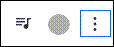
If the connection indicator dot in the upper right corner is gray, then the Rectangle Health Windows Agent (the software that connects to a card reader) is either not running or not installed. To resolve this:
- Right-click on Start (the icon with four blue squares on your Windows computer's taskbar) > select Task Manager from the list that appears > open the Services tab (puzzle piece icon).
- Navigate to the Windows service agent RHWindowsAgent in the list > right-click on RHWindowsAgent > select Start.
If you could not find RHWindowsAgent in the Services tab list, call our Technical Support team at 800-337-3630 (option 4).