All Ingenico iSC250 and certain Lane7000 devices have an internal reboot cycle that causes the card reader to reboot every 24 hours from the last time it was powered on.
If your card reader reboots every 24 hours, you can "set" the timer for this 24-hour reboot cycle to occur outside of business hours so that the cycle does not impact your daily operations. After you "set" the timer for the 24-hour reboot cycle, the card reader will then reboot 24 hours from when it last rebooted.
To set the 24-hour reboot cycle to occur at a different time:
- Outside of business hours, at a time when a daily reboot will not disrupt your operations, reboot your device.
- This step will vary depending on whether you have an iSC250 or Lane7000 card reader.
For iSC250 card readers: Hold down the yellow CLEAR button and the – (minus) button simultaneously, until the device beeps.
For Lane7000 card readers: Hold down the yellow arrow button and the # (pound) button simultaneously, until screen says, "Reboot in progress."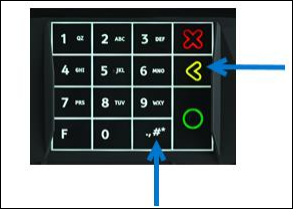
Your card reader will take about 30-60 seconds to reboot, and then it should reconnect to Bridge Payments.