
The Organization Dashboard in Bridge Compliance provides high-level insights into the compliance status, scores, and task completion for all your practice locations. You can access the Organization Dashboard by clicking Dashboard > Organization from the left menu. For the Organization option to be visible, you must be assigned the role of Organization Admin.
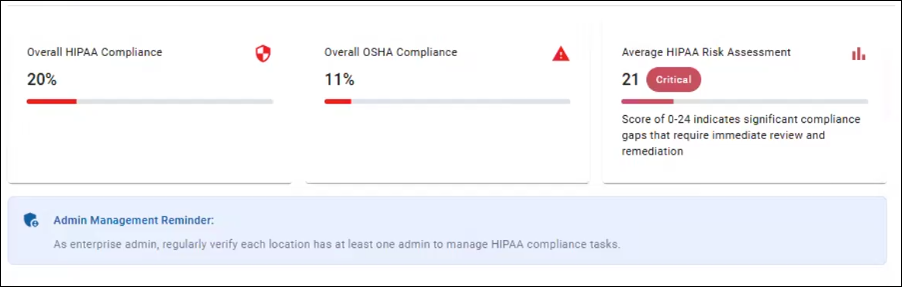
You can use the top half of the Organization Dashboard to review:
- Overall HIPAA Compliance
- Overall OSHA Compliance
- Average HIPAA Risk Assessments
- Admin Management Reminders
The Location Compliance Overview section is where you can monitor HIPAA and OSHA compliance across all your practice locations. This data is synced daily. To find locations in this section to review, you can:
- Search for a specific location using the Search function.
- See all locations by going through the list.
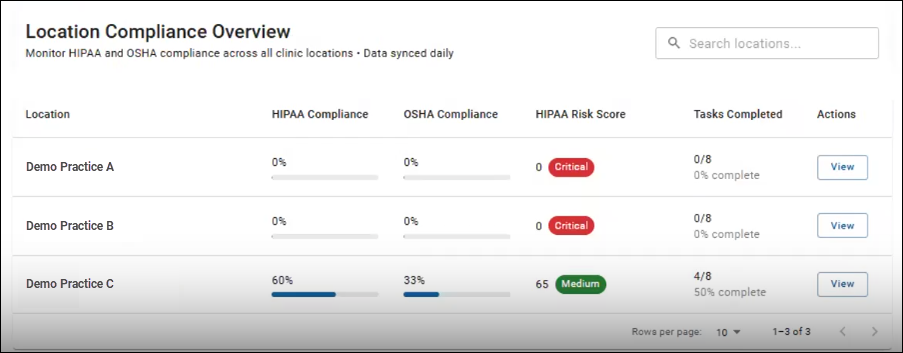
The following details are provided for each location listed:
- Location
The name of the practice. - HIPAA Compliance
A percentage score shows how HIPAA compliant the location is. - OSHA Compliance
A percentage score shows how OSHA compliant the location is. - HIPAA Risk Score
A numbered score and status of Critical, Medium, or Low show the location's HIPAA risk. - Tasks Completed
Shows how many tasks are completed out of the total (e.g. 4/8) as well as a percentage score.
You can see more details on which compliance tasks are incomplete for a location by clicking the View button under the Actions column. This will pull up a location-specific pop-up, and the Compliance Tasks provides the following information:
- Task Name
- Status
Shows Incomplete or Complete. - Est. Completion Time
Shows approximately how long it will take to complete the task. - Number of Tasks
Shows how many tasks are completed out of the total (e.g., 4/8).