
To enable one-click posting to your practice management system (PMS), contact [email protected]. Once set up, both claim level and claim-line level (procedure level) payments and remittance details can be posted to any PMS.
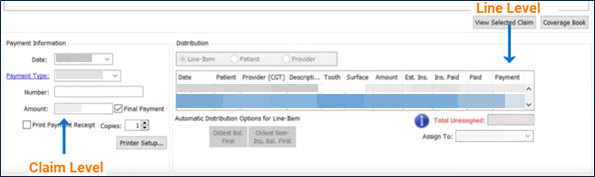
- Claim level amount: The total Billed Amount of each claim in an insurance payment.
Example: A claim has three lines and the following Billed Amounts for each: $50.00, $25.00, and $30.00. The claim level amount would be $105.00 in a PMS. - Claim-line level (procedure level) amount: The Billed Amount of a single claim line in an insurance payment.
Example: One line in a claim has a Billed Amount of $25.00. The claim-line level (procedure level) amount for it would be $25.00.
Video Instructions
Go to the 1 minute and 49 seconds mark of the video to see how to post claim and procedure payments to your other systems with just a click.
Text Instructions
- Open the patient profile in your PMS.
- Click PayerSync in the left menu of Bridge Payments.
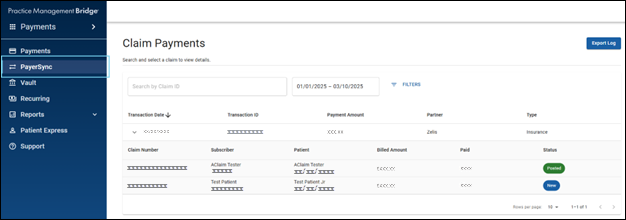
You can sort and rearrange the columns on the Claim Payments screen to have greater control over the information display.
You can also use filters to only show unposted claims. - On the Claim Payments screen, select an insurance payment to view the list of claims included in that payment.
- To view the EOP, including adjustment details and Remark Codes, select a claim.
- On the Claim Details screen, click Post in the top right corner.
What Happens Next
The claim level amount and claim-line level (procedure level) amount are posted to your PMS. The image below shows the posted amounts in a PMS. The placement of these amounts will differ depending on the PMS you use.
Helpful?