
If you do not see Patient Express as an option in your menu within Bridge Payments, contact your practice administrator or contact Customer Care at 800-337-3630 (option 3) or [email protected].
In Patient Express within Bridge Payments, you can send digital registration forms to patients who have a Patient Express record. A commonly sent form is the Payment Authorization form, but the form you send depends on the form type your practice chose. See About Online Patient Registration and Digital Forms (Patient Express) for more information.
There are two ways to send this invitation to register online:
- Send a form while adding a new patient to Patient Express.
- Send a form to a patient already in Patient Express.
Send a Form while Adding a New Patient to Patient Express
Instructions
- Select Patient Express in the main menu.
- Click Add next to Add Patient.
- Enter the patient’s information and click Save.
Be sure to include their contact information so you can share the registration link with them. - Click Email Invitation, Text Invitation, or both under Patient Forms.
Clicking one or both invitation buttons will immediately send the patient the registration invitation. You will receive a confirmation message after clicking the invitation button(s).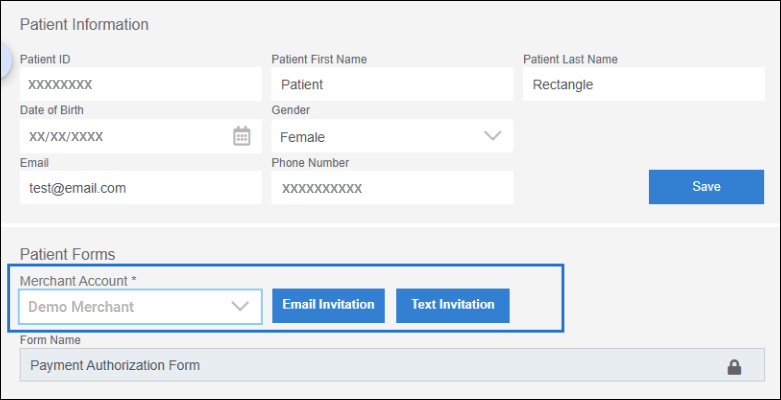
Send a Form to a Patient Already in Patient Express
Instructions
Method 1:
- Select Patient Express in the main menu.
- Search for the patient.
- Click the Patient ID of the patient you want to invite to register to open their Patient Express record.
- Click Email Invitation, Text Invitation, or both under Patient Forms.
Clicking one or both invitation buttons will immediately send the patient the registration invitation. You will receive a confirmation message after clicking the invitation button(s).
Method 2:
- Select Patient Express in the main menu.
- Search for the patient.
- Click Resend Form under the Send Message column.
Clicking Resend Form will immediately send the registration invitation in a text message to the patient.
Helpful?