
The Text-to-Pay Reports feature gives you visibility into the individual Text-to-Pay messages and multiple Bulk Text-to-Pay messages (if enabled) that you send, with full details on the status and success of the messages. After your Bulk Text-to-Pay file processes, you can view details about each sent Text-to-Pay message.
Prerequisites:
- You must have Patient Express enabled for your account.
- You must have Bulk Text-to-Pay enabled for your account to access Bulk Text-to-Pay tracking.
Interactive Walkthrough
To follow an interactive walkthrough, see Tracking Text-to-Pay Messages & Payments.
Text Instructions
To access Text-to-Pay Reports, click Reports in the left menu and then select Text-to-Pay Reports.
What Happens Next
The Transaction Reports - Text to Pay screen displays 10 Text-to-Pay records per page and provides real-time details, including:
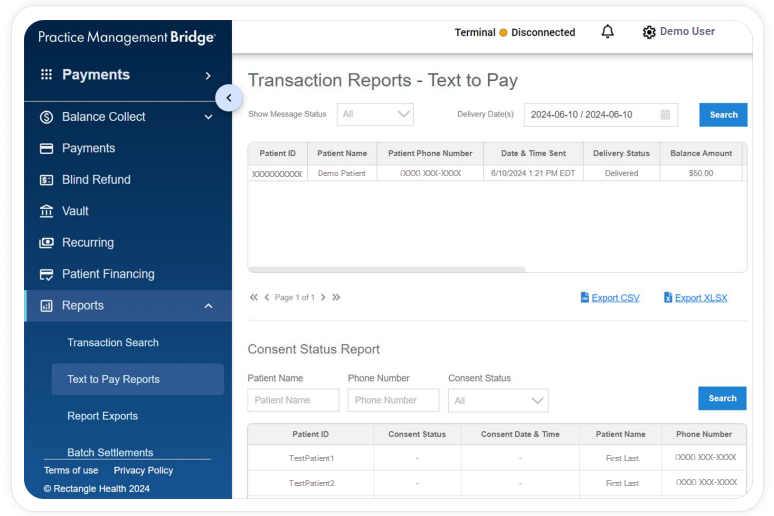
- Patient ID
- Patient Name
- Patient Phone Number
- Date & Time Sent
- Delivery Status
- Balance Amount
- Paid Amount
- Message Status
- Date & Time Opened
- Time to Open
- TXN ID
- Method
After a message is sent, the Delivery Status options are:
- Delivered: For successful messages
- Undelivered: For messages that fail for any reason
- Sending: For messages still in the queue to be sent
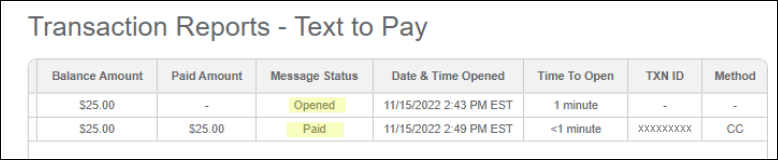
When a patient taps the Balance Collect link in the Text-to-Pay message, the following information appears in the table:
- The Message Status changes from blank (-) to Opened.
- The date and time the Balance Collect link was tapped.
- The time it took the patient to tap the Balance Collect link.
When a patient pays online via the Balance Collect link, the following information appears in the table:
- The Message Status changes from Opened to Paid.
- The amount the patient paid.
- The Transaction ID (TXN ID).
- The payment method.
Like other reports, Text-to-Pay Reports can be exported as a CSV or XLSX file.
Need Help?
Contact Customer Care at 800-337-3630 (option 3) or [email protected] if you:
- Do not see Patient Express as an option in your menu within Bridge Payments
You can also contact your practice administrator. - Do not have Bulk Text-to-Pay and would like to add it to your current package
You can also contact your Relationship Manager.